
The Unseen Lifeline of FTTP
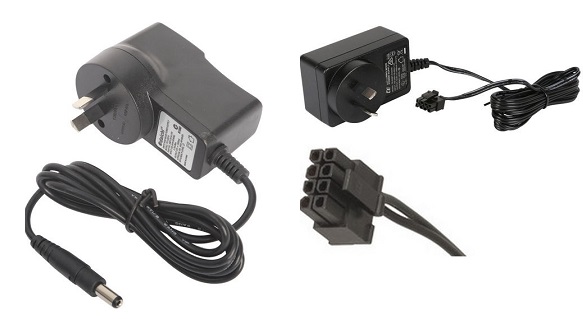
If you’ve ever stared at a dead NBN Connection Box (NTD) and wondered why the internet suddenly went dark, the answer is probably a missing 12 V/2.5 A power adapter. This isn’t a generic charger; it’s an eight‑pin, Molex‑style brick that belongs to nbn and is tied to the address. It powers the Arris CM8200, Telstra‑branded NTDs and a handful of other FTTP devices. Unlike a laptop charger, you can’t swap it out for a phone wall wart without risking a fried termination device.
The Great Disappearance Act
- Misplacement: Homeowners treat the power cord like any other piece of clutter. When the house is emptied, the eight‑pin adapter ends up in a box of random cables, a junk drawer or a storage unit that never sees daylight again.
- Accidental Disposal: The cord’s nondescript black jacket makes it easy to mistake for e‑waste. A quick sweep of a garage or a “clean out” session can send it straight to the landfill.
- Pet and Rodent Damage: In suburban Australia, rats and mice see the cord as a chew toy. A gnawed connector looks like a dead battery and forces a replacement.
- Electrical Surges and Wear: Power spikes, dropped adapters or just years of plugging and unplugging can fry the internal circuitry, rendering the unit useless.
- Cable Confusion: The market is saturated with 12 V adapters for routers, cameras and set‑top boxes. The eight‑pin tip is unique, but a quick glance often leads users to stash it with a generic charger, only to lose track of it later.
Fixing the Problem: From ISP to DIY
- Call the ISP: Telstra, Optus, Aussie Broadband and other ISPs can dispatch a genuine replacement. The catch? It may take a week and you’ll still need to confirm the model matches your NTD.
- Manufacturer Support: Identify the exact NTD model (e.g., Arris CM8200) and hit the maker’s support line. Most manufacturers keep a stock of the 12 V/2.5 A adapters and can ship them directly.
- Third‑Party Suppliers: Australian electronics distributors like Campad Electronics and Aus Electronics Direct list “NBN power supply” units. The key is matching three specs: 12 V DC, 2.5 A and the eight‑pin Molex connector. Prices hover between AUD 30–50 and shipping is usually next‑day.
- Universal Adapters: A high‑quality universal power brick with interchangeable tips can be a stopgap, but only if you lock the voltage at 12 V and set the current limit to at least 2.5 A. One wrong setting and you risk bricking the NTD.
- Marketplace Hunting: Amazon Australia and eBay have a steady stream of “NBN 8‑pin power adapter” listings. Vet the seller, read the reviews and double‑check the label. Counterfeit units often lack proper voltage regulation and can fry the box.
Best Practices: Keep the Cord Where It Belongs
- Leave It Behind: The power supply is NBN Co property. When you move, leave it at the address. The incoming tenant will need it and you avoid a replacement headache.
- Label It: A simple “NBN Power Cord – 12 V/2.5 A – 8‑Pin” sticker on the cable or adapter prevents accidental disposal.
- Dedicated Storage: Keep the cord in a clearly marked box with the NTD and any other nbn equipment. A small zip‑lock bag works wonders.
- Document the Specs: Snap a photo of the rating label on the adapter and store it in your phone or cloud notes. When you need a replacement, you have the exact numbers.
- Inspect Periodically: Look for frayed insulation or chew marks. Replace a compromised cord before it fails completely.
Bottom Line
The NBN power cord is a tiny, address‑bound component that can bring an entire fiber connection to a halt when it disappears. Misplacement, accidental trashing, pet damage and plain old wear are the usual culprits. The fix is straightforward: verify the 12 V/2.5 A, eight‑pin spec, then source a genuine or vetted third‑party adapter from your ISP, the manufacturer or a reputable electronics supplier. And for the love of broadband, keep the cord where it belongs, right next to the NTD, not in the junk drawer.
